Choosing a laptop in 2021 (and a mini anti-Apple rant)

I’ve been looking to upgrade our laptops here at TfW for a few months now. We’ve been using what would be politely considered as ‘vintage devices’, and new computing devices were well overdue.

The laptop I’ve been using since November 2011 is a 15” Apple MacBook Pro (early-2011) which I absolutely loved working on. It’s gotten me through various projects and one Master’s degree, but I’ve had my issues with it. Due to a manufacturing defect with the discrete AMD GPU’s soldering, my motherboard was replaced thrice under warranty and once out-of-warranty. As the device was originally purchased in California, I was even contacted by Whitfield Bryson & Mason LLP about being included in a class-action lawsuit against Apple! I understand that this lawsuit was part of the reason Apple finally allowed for out-of-warranty motherboard replacements on this series of laptops (justifying my 4th free motherboard replacement). After the final motherboard repair however, I felt that any further use I got out of this laptop would be a bonus, and didn’t really expect it to run for more than a year or so. I swapped out the HDD for an SSD in 2014, the optical drive for a secondary storage tray in 2015, and replaced one of the two fans in 2017. When the GPU finally gave up in November 2019, I found some code online that bypassed the problematic discrete AMD GPU and forced the use of the integrated Intel GPU. When the screen started up with vertical line displays halfway through 2020 (indicating some sort of hardware failure), I knew that the end was in sight. Rather than wait for the device to fail catastrophically, I decided to decommission the laptop. On the 2nd of January 2021, just over 9 years after I received it, I backed up my data one final time, stripped out both SSDs and packed up the laptop along with its much-soldered charger (which is another story entirely). It’s now sitting in a box waiting to be taken to a repair station for its final end-of-life diagnosis (refurbish and donate, or dismantle and recycle).

Working at the juncture of technology and conservation, I used to feel an immense amount of guilt every time I considered purchasing a new piece of equipment. I’ve never actually felt guilty about actually buying any equipment though, and that’s because on average, I spend between 6 months to a year studying my options, really working through what I think I need and why. Meanwhile, I solder and hack and do whatever I can to keep existing equipment in action for as long as I can before it just isn’t worth the time and effort anymore. Then, it’s disposed of as responsibly as possible. iFixit has a huge part to play in all of this; I rely on the guides to fix malfunctioning or broken hardware, and on the repairability scores when considering new equipment.

At TfW, we work with a lot of visual data, and manipulate it using spreadsheet, statistical computing and GIS software packages. Most of the commercial GIS software we use, for satellite and drone images, has been optimised for Windows machines. Even so, I would have considered MacBooks dual-booting OS X and Windows for our new machines, if not for their terrible repairability scores, high prices and lack of a touch screen. With the newer MacBooks, it is almost impossible to perform any upgrades or repairs without replacing the entire motherboard, as every component is just soldered onto it. This is clearly visible when looking at iFixit’s laptop repairability score; a MacBook Pro 15” from 2012 has a score of 7/10, while one from more recent years, complete with Retina Displays and/or Touch Bars, have scores of 1 or 2. In practice, this means that after the 1+2 year warranty period is over, it’s much cheaper to just throw a MacBook away than to repair it. This is true of laptops from other companies as well, but Apple’s egregious battles against the global #righttorepair movement have left a really sour taste in my mouth. The design and UI/UX may be great (though that’s disputable what is the Touch Bar even for?) but why buy from a company actively opposed to a) fixing things and b) environmental sustainability?

So in 2020-21, when considering new laptops, MacBooks were out of the question. My desired features were a touch screen, portability, repairability/upgradability and price. The laptops I was seriously considering (as of Nov 2020) were the Microsoft Surface Pro 7, the HP Envy x360 and Spectre x360, the Dell XPS 13” 2-in-1, and the Lenovo Yoga C740 and Ideapad Flex 5. Except for the Surface Pro, all the others seem to be great machines; while it does look quite nice, it’s over-priced with the keyboard(!?) and pen only available as even-more expensive extras. Based on the fact that I found a rather nice deal on the Ideapad Flex 5, I finally picked up two devices (Ryzen 7 processors, 8GB RAM, 512GB SSD; ~INR 63,000/- each) directly from the Lenovo online store, inclusive of a 3-year warranty, free shipping and Lenovo Active Pens (see that Microsoft?).

The laptops arrived within a week of placing the order, in cardboard boxes with a little too much plastic wrap. Aside from that, they seem to be fit-for-purpose; the RAM and processor aren’t upgradeable, but the storage SSD and battery can be replaced. After the Lenovo/Superfish bloatware scandal of 2014, I was concerned about the pre-installed software, but aside from two MacAfee trialware packages (which I quickly uninstalled) the laptop seems to be clean. The pen works with QGIS, so we can now finally draw polygons by tapping on the screen; now we’re really doing geography in the 21st century! It’s been less than a week since these devices arrived so it’s too early to tell, but my hope is that these laptops allow us to work until at least 2026.

To close, I’d have to state that this is not a Lenovo advertisement, and we’re not technology evangelists; if you need a laptop and can’t fix your old one, buy an appropriate device from any manufacturer you like. Just try and make sure that it’s possible to make it work at least a little longer than it’s been designed to.
Using Google Earth Engine to map mangroves in Goa

Over the last few days of 2020, I’ve been learning how to use Google Earth Engine (GEE). Guided by the tutorials provided by NASA’s Applied Remote Sensing Training Program (NASA-ARSET) on mangrove mapping in support of the UN’s Sustainable Development Goals, I’ve been attempting to use GEE to map mangroves in my area of interest - St. Inez Creek, Panjim, Goa. While I’ve conducted similar exercises using traditional desktop-based GIS software before, I’m both a new GEE user and new to JavaScript coding.


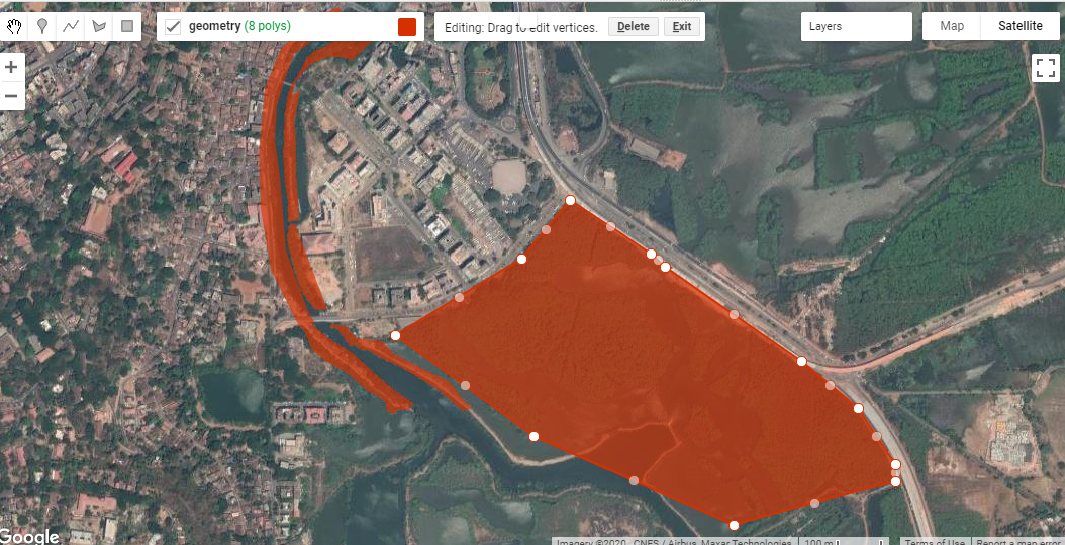
The first part of the exercise consisted of loading satellite data into GEE. Compared to finding relevant satellite images for an area, downloading them onto my device and loading them into desktop GIS software, the process in GEE was much faster and easier for me to conduct. The next step consisted of drawing polygons for the area of interest. This was similar to creating vector polygons in GIS software, and the intuitive interface made it straightforward to begin and pause polygon creation, as well as to edit existing polygons. Exporting these into kmls though took a lot of time to process, at least on my device.

Fig. 1: Creating polygons for my area of interest in St. Inez, Panjim, Goa.

Fig. 1: Creating polygons for my area of interest in St. Inez, Panjim, Goa.

I was looking at decadal change in the area between the years 2009 and 2019. The script made available with the NASA-ARSET tutorials creates mosaics by first looking for images from a year before and after the designated year of interest, and by then masking clouds. I was only able to do this in GEE because the JavaScript code for this was already written out and available to me, but I found this part of the processing extremely powerful, especially compared to doing it on my own device. I then applied vegetation indices onto these mosaics, creating false colour composites that could be used to identify vegetation in my area of interest between 2009 and 2019.

The fourth major step consisted of creating a Random Forest Model for both the years. For this, I used the false colour composites of the mosaics, derived using the vegetation indices in the previous step, to create categories of mangrove and non-mangrove areas, and marked examples of each using visual identification. Because I had clear instructions available for this part (via the tutorials), this was a straightforward procedure. The mangrove and non-mangrove categories had a property of land cover with a binary value of either 0 or 1. I imagine that such a table would look similar to an attribute table, although I was unable to export it to a shapefile to check.

Fig. 2: Visual classification of mangroves for training data.

Fig. 2: Visual classification of mangroves for training data.

After training the data, I ran the Random Forest Model  JavaScript code in GEE . On viewing the area classified as mangrove extent for the year 2009, it looked like a lot of  what should have been mangroves had been marked otherwise.  An internal test indicated an accuracy of 0.7; ideally, the closer this value is to 1, the more accurate the model. To improve the accuracy, I added more training data and then ran the model again. This time the accuracy was much higher and the area under mangrove extent appeared to be depicted more accurately.

Fig. 3: Mangrove extent in 2009, as determined by the Random Forest Model implemented in GEE.

Fig. 3: Mangrove extent in 2009, as determined by the Random Forest Model implemented in GEE.

The outputs of mangroves appear to be fair estimates of actual ground-level mangrove extent, but would need to be verified using additional data and alternative methods to obtain an objective assessment as to its accuracy. The model estimated that within my area of interest, mangrove extent in 2009 was 29.82 ha while in 2019 it was 28.74 ha. I tried to run an external accuracy test using the Class Accuracy plugin in QGIS, which reviews random stratified data from the random forest to check whether it has been classified correctly. However, I kept receiving errors while trying to produce an error matrix for the classification using the plug in so that’s something I still have to work on.

Fig. 4:  A screenshot of the GEE console displaying the error matrix for the model

Fig. 4: A screenshot of the GEE console displaying the error matrix for the model

The second part of the exercise was to create a GEE application which would allow a user to interact with the data directly, visualising the change in mangrove cover in the Area of Interest within the determined time period. I had some setbacks with this section, which I’ll describe in detail.

I began by exporting the mangrove extents calculated previously into raster images to be used for classification within the GEE app I was creating. The images were then imported into the script, and used as the basis of the visualisation. When I ran the JavaScript code I’d modified, the app appeared but the links from the buttons appeared to be broken; despite picking a year, no layer appeared on the map. The process of looking for errors felt similar to that I’ve encountered in RStudio, where the line of code with the error was highlighted,  and some indication of the error’s nature was provided as well. This definitely made reading and editing the code easier for a GEE/JavaScript novice like me. Having fixed this, I ran the code again and this time the layers appeared; however, instead of displaying mangrove extents, fixed-area blocks appeared within the area of interest for both years (Fig 5).

Fig. 5: The rectangular block error in my GEE app; this should depict mangrove extent, but doesn’t..

Fig. 5: The rectangular block error in my GEE app; this should depict mangrove extent, but doesn’t..

Despite several scans of the script to find errors and understand why this happened, I’m still quite confused.  The issue appears to be in the images that I’m exporting. Even though the image being exported is the area classified as mangrove extent, which appears correctly on the map, when exported as an image, it’s saved as these blocks in the area. I’m still trying to figure out exactly what’s going wrong here.

Overall, this was a fun exercise to learn and work through, and a good introduction to Google Earth Engine’s capabilities for conservation geography. The entire process of actually processing the images, applying indices and using a Random Forest Model was faster in GEE than it would have been on my desktop, thanks to the code available to me via the NASA-ARSET tutorials. With regard to setting up the GEE apps, I still have a lot of trouble-shooting to do over the next few weeks. If you have any leads, please do comment on this post, or send me an email via our contact form.

Helping Ensure Ethical Indian Drone Operations

This blogpost was originally posted on the WeRobotics blog (link) on the 8th of October 2020

The global civilian drone industry is currently in a growth phase. From its initial beginnings in the mid-2000s as a hobbyist activity to its warranting regulatory supervision to its current status as a potential game-changer for national economies, the drone industry seems to have weathered it all. Even with the pandemic and associated lockdowns, the drone industry still has the potential to grow, providing as it does the option of ensuring that work gets done safely and hygienically. Over these years, the number of both drone users and the various applications of drone-acquired data have grown massively. 

It’s possible for a project to comply with existing regulations and legislation, and even be commissioned by the state, and still be deficient from an ethical perspective.

As with most emerging technologies, drones have influenced and exacerbated a plethora of complex social interactions. When drones are used without adequate consideration of their impact, they can inflict serious harm on individuals and communities. In India, policies, regulations, and social norms around drone use have not kept pace with the technological applications, especially around what constitutes safe and ethical drone use. At Technology for Wildlife, we are conservation geographers and drone pilots; thus, we are also participants in the Indian drone industry. We’ve come to realise that accepting certain work proposals would put us in ethically complicated and questionable situations that could potentially compromise our desire to do good. However, each time we choose to decline a project that does not fit with our values, we know there are enough other drone operators out there for the project to go ahead anyway. It’s possible for a project to comply with existing regulations and legislation, and even be commissioned by the state, and still be deficient from an ethical perspective. There is a clear need to create and implement guidelines for the drone industry regarding the ethical operation of drones to complement the government-mandated regulations.

In this context, in late 2019, we applied for the WeRobotics Unusual Solutions Competition, intending to understand what would be required to have participants in the nascent drone industry commit to conducting ethical operations. Today, we’re pleased to present our work in a report titled: Towards Incorporating Ethical Considerations into Indian Civilian Drone Operations

UnusualSolutions_Shashank_Slides_25Feb2020_v1.jpg

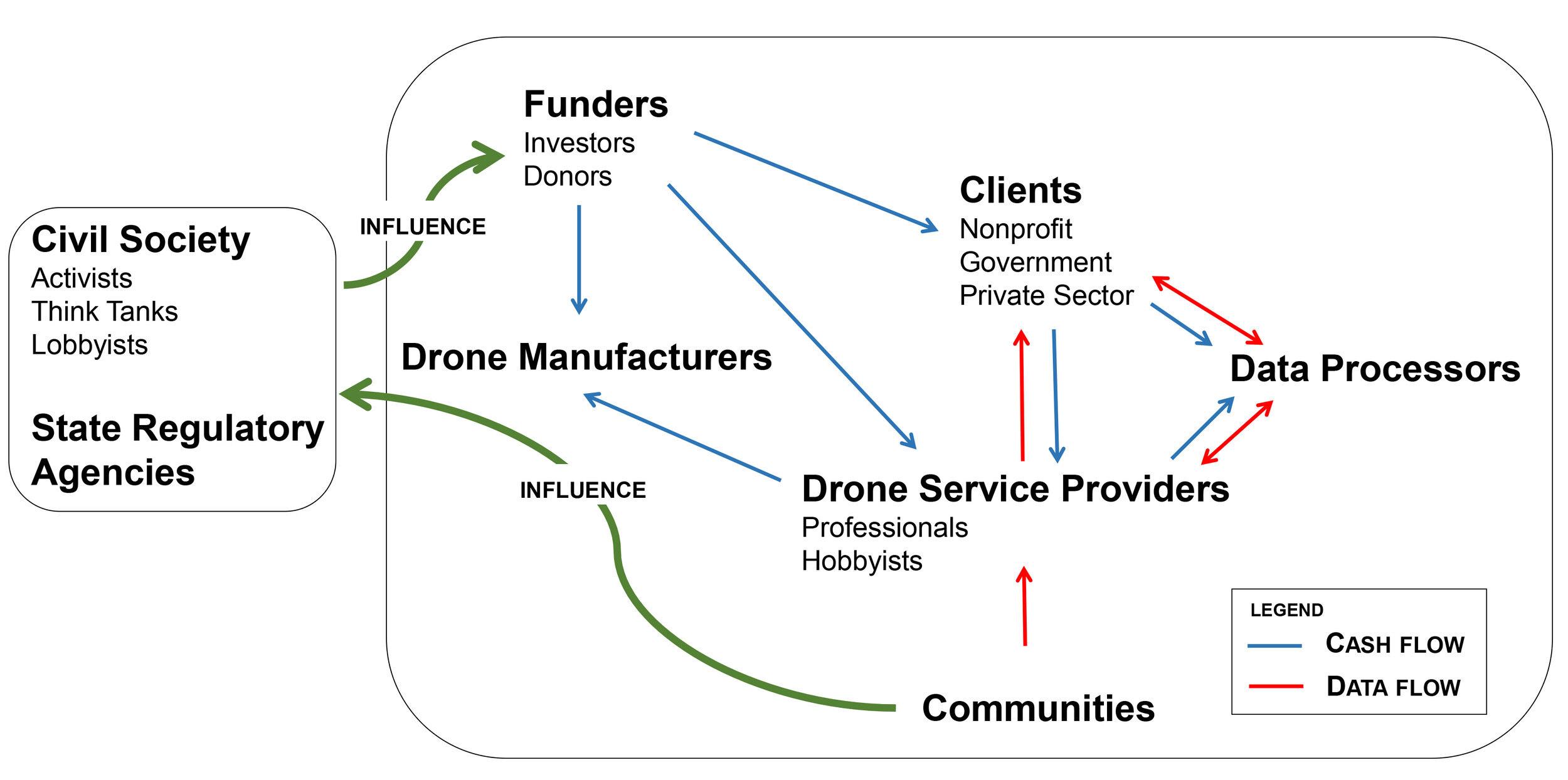
Rather than providing prescriptive rules on ethical operations, we’ve used our research and sectoral knowledge to put together a roadmap to what we believe ethical drone operations should look like in the Indian context, and how and why specific stakeholders should be engaged. This report is intended (to quote from it directly) for “anyone in, or engaging with, the drone industry and will be particularly relevant to those who intend to build solutions that would address the social implications of civilian drone use.” While we have focused on the Indian drone industry, it is quite likely that our work is also applicable to other countries with similar contexts.

We hope that in these troubled times, this report is one of the many pieces required to ensure that drone operations are empathetic, considerate, and ethical, both in India as well as globally.